Global Configuration
Global Configuration holds Data Sync settings that apply to every sync job: processor thread counts, staging behaviour, and Data Sync issue email alerts.
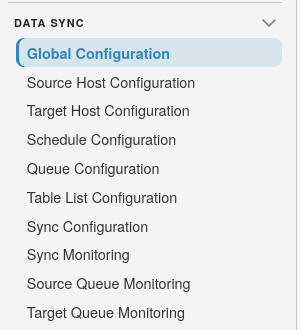
To open the page, select the SQLSync icon on the landing page, then choose Data Sync >> Global Configuration:
Note
You need the SyncUpdate permission to open this page. Data Sync must also be licensed and Sync Feature Enabled must be on under SQLPro >> Administration >> Advanced Settings.
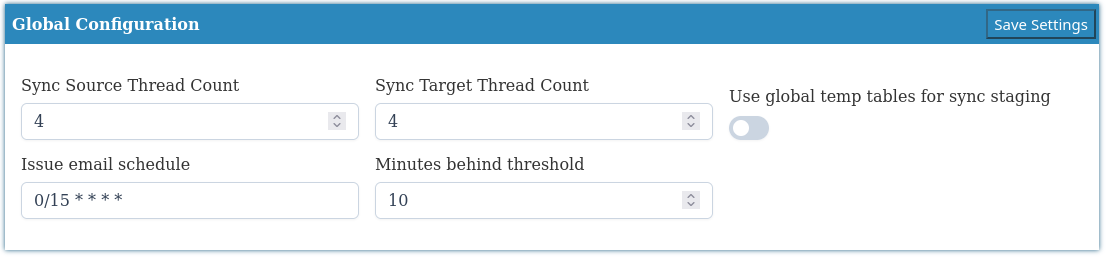
Select Save Settings to store the values. Thread count changes are picked up when the ConductorSQLPro service restarts. The issue email schedule applies as soon as you save.
Warning
After changing Sync Source Thread Count or Sync Target Thread Count, restart the ConductorSQLPro service.
Processor threads
| Setting | Description | Default |
|---|---|---|
| Sync Source Thread Count | Number of worker threads that process source-side sync queue work | 1 |
| Sync Target Thread Count | Number of worker threads that process target-side sync queue work | 1 |
Tip
Leave thread counts at 1 unless you have measured that source or target
queues are backlog-bound and the SQLPro host can support more parallelism.
Raise source and target counts independently based on which side is the
bottleneck.
Staging
| Setting | Description | Default |
|---|---|---|
| Use global temp tables for sync staging | When on, initial and delta source copies use SQL Server ## global temp tables instead of physical tables in tempdb |
Off |
Issue email alerts
SQLPro can email a Data Sync Issues Report when sync configurations have table errors, checksum errors, or tables that have fallen behind. The job uses the mail list configured under SQLPro >> Administration >> Mail.
| Setting | Description | Default |
|---|---|---|
| Issue email schedule | Hangfire cron for the Data Sync Issue Email Alerts job, in the SQLPro host's local time. Default is 08:00 daily (0 8 * * *) |
0 8 * * * |
| Minutes behind threshold | How long a syncing table with no error can go without a successful check before it is treated as behind. Set to 0 to turn lag alerts off |
0 |
Note
A table counts as behind when its status is syncing (S), it has no error
message, and Last Sync Check is older than the threshold. The email is
skipped when no configurations currently have issues.