Advanced Settings
Advanced Settings controls system-wide options that affect how SQLPro processes SQL queues, sends mail, writes syslog output, and whether Data Sync is enabled.
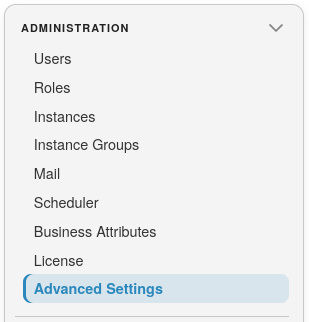
To open the page, select SQLPro on the landing page, then Administration >> Advanced Settings:
Note
You need the AdminAdvancedSettingsUpdate permission to open and change Advanced Settings. Without it, the menu item is hidden.
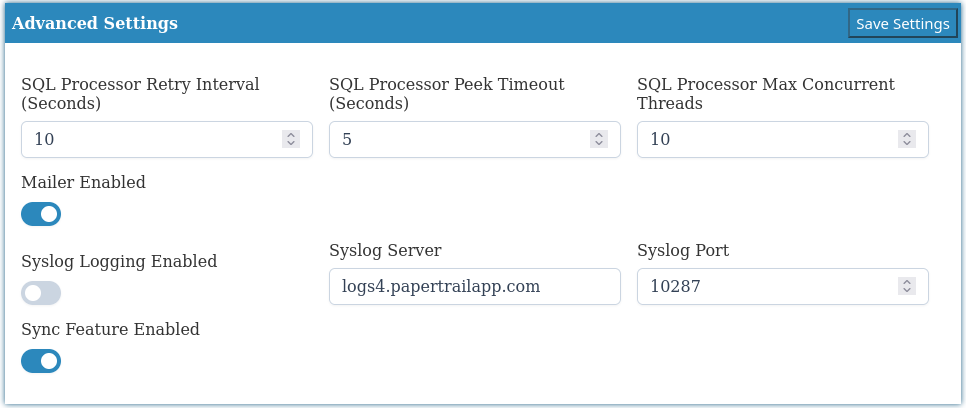
Select Save Settings to store the values. Changes are written to the SQLPro global configuration table.
Warning
After saving, restart the ConductorSQLPro service for the new settings to take effect.
SQL Processor
These settings control how SQLPro processes SQL message queues for connected instances.
| Setting | Description | Default |
|---|---|---|
| SQL Processor Retry Interval (Seconds) | How long to wait before retrying a failed SQL queue message | 10 |
| SQL Processor Peek Timeout (Seconds) | How long a processor waits when peeking for the next message on a queue | 5 |
| SQL Processor Max Concurrent Threads | Maximum number of SQL messages that can be processed at the same time | 10 |
Tip
Increase Max Concurrent Threads only when the SQLPro host and target instances can handle more parallel work. Too high a value can overload the SQLPro service or the databases it talks to.
Mailer
| Setting | Description | Default |
|---|---|---|
| Mailer Enabled | Master switch for outbound email from the SQLPro service. When off, SQLPro does not send alert or report emails even if SMTP is configured under Mail | On |
Syslog logging
Use these settings to forward SQLPro application logs to a remote syslog collector (for example Papertrail or another SIEM).
| Setting | Description | Default |
|---|---|---|
| Syslog Logging Enabled | Turns remote syslog forwarding on or off | Off |
| Syslog Server | Hostname or address of the syslog collector | logs4.papertrailapp.com |
| Syslog Port | UDP/TCP port used by the syslog collector | 10287 |
Note
Syslog settings are applied when the ConductorSQLPro service starts. After changing them, restart the service and confirm log delivery in your collector.
Data Sync
This switch controls whether Data Sync runs. Thread counts, staging, and issue email settings are now under SQLSync >> Data Sync >> Global Configuration.
| Setting | Description | Default |
|---|---|---|
| Sync Feature Enabled | Enables or disables the Data Sync feature. When off, sync processors do not start and users lose the SyncUpdate permission | Off |
Warning
Turning Sync Feature Enabled off stops sync processing and removes Data Sync access for users until it is turned back on and the service is restarted.