Scheduling
To schedule queries go to the Query Schedules page where you can create schedules which can be added to queries.
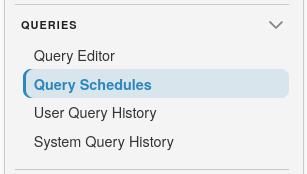
- Schedule Name: The scheduled date and time.
- Schedule: The scheduled date and time using a cron string.
- Number Scheduled Queries: The amount of times the specific schedule has been assigned to a query.
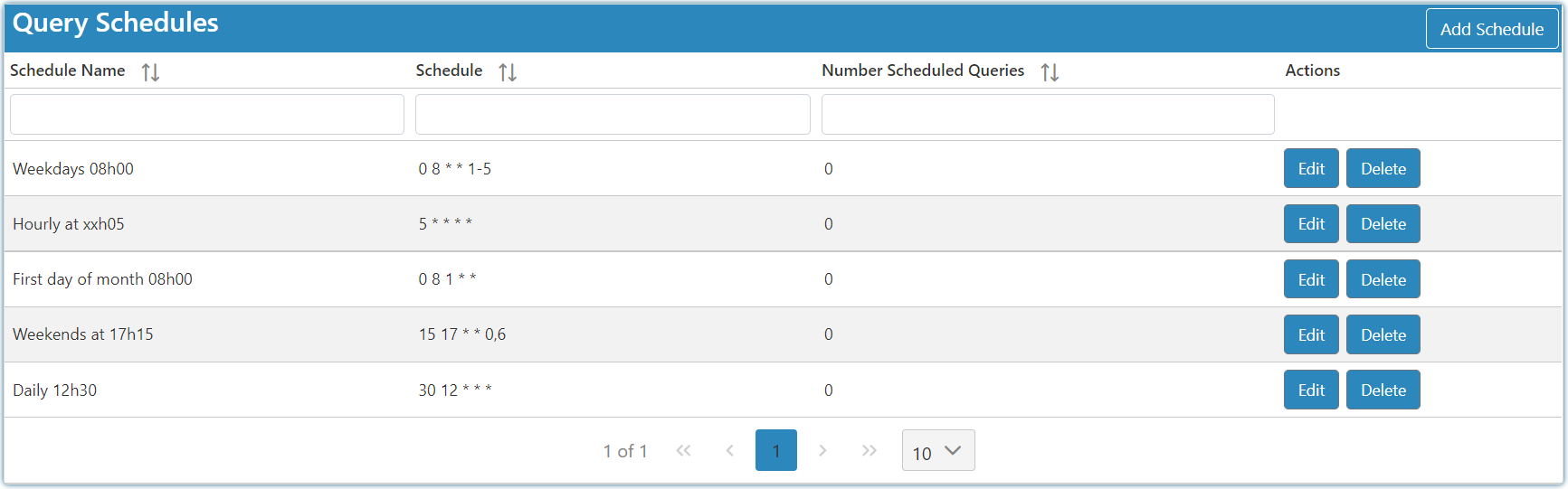
On the Adding and Editing Screen, define the schedule with a cron expression. SQLPro can auto-generate the schedule name, or you can provide a custom name.
Use the Next Executions preview to confirm the schedule will run at the expected times before assigning it to a query.
Cron format
SQLPro uses a standard 5-field cron format:
minute hour day-of-month month day-of-week
Example:
0 8 * * 1-5 = every weekday at 08:00
Field order
- Minute (0-59)
- Hour (0-23)
- Day of month (1-31)
- Month (1-12)
- Day of week (0-6, where 0 = Sunday)
Useful operators
*any value,value list separator-range of values/step values
Common examples
| Cron expression | Meaning |
|---|---|
*/5 * * * * |
Every 5 minutes |
*/15 * * * * |
Every 15 minutes |
0 * * * * |
At the top of every hour |
0 */2 * * * |
Every 2 hours |
0 6 * * * |
Every day at 06:00 |
0 8 * * 1-5 |
Every weekday (Mon-Fri) at 08:00 |
30 9 * * 1 |
Every Monday at 09:30 |
0 0 * * 0 |
Every Sunday at midnight |
0 18 * * 5 |
Every Friday at 18:00 |
0 0 1 * * |
On the first day of each month at 00:00 |
0 12 1 1 * |
At noon on 1 January each year |
15,45 * * * * |
At 15 and 45 minutes past every hour |
For help building cron expressions, use crontab.guru.